 Generally each hosting provider will provide auto installer tool like Fantastico De Luxe, Softaculous and QuickInstall,
so with this tool you can easily to install WordPress. I think you will
get a problem, if the hosting provider doesn’t provide auto installer
tool, so you must install WordPress manually.
If you haven’t experience to install WordPress manually, here I will share the steps to install WordPress manually. Before you start to install the wordpres manually, please download first the latest wordpress version, for example I downloaded wordpress version 3.4 you can download it at wordpress.org/download
After download the WordPress file is complete, please follow the steps below:
- Please login to your Cpanel account then upload all WordPress file in “Public Html” folder, you can upload it using “File Manager” or using a FTP tool like FileZilla.
- After upload the WordPress file is complete then you must create a new database and SQL user:
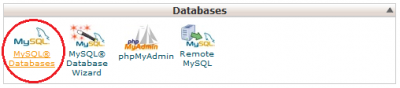
1. Please select “MySQL® Data base” menu
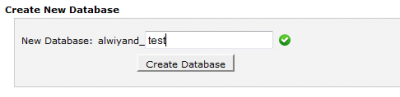
2. Create new database
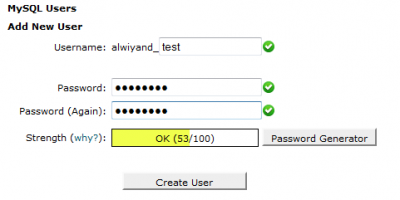
3. Create new user SQL
4. Add user SQL to database
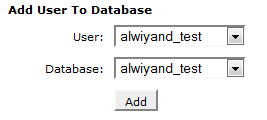
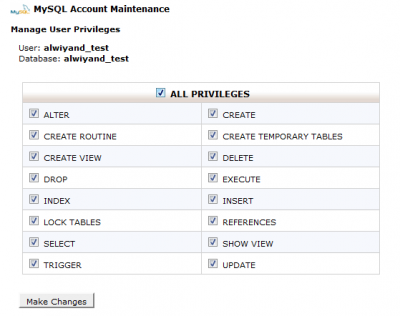
Please ceklist ALL PRIVILEGES then click Make Changes button
- Now you are ready to continue next steps, please type your domain name on your browser, then please click Create a Configuration File button.
- You will see Let’s go button please click it, then please fill the form according your database name and SQL user. Once the form is complete please click Submit button.

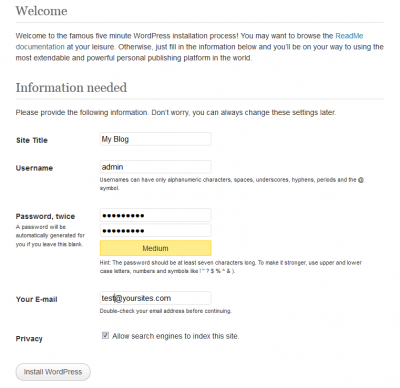
- You will go to install page, please fill the form as you like then click Install WordPress button.
No comments:
Post a Comment